How can firewire audio interfaces be used today?
It is not impossible to use old Firewire audio interfaces today. To verify this, one only needs to turn on a desktop PC from a few years ago with a compatible Firewire port, install an appropriate operating system and driver, and use an older version of a DAW such as Pro Tools to record or play back audio.
However, this is far from practical for everyday use. Windows XP, 7, and 8 have been out of support for many years, as have various versions of macOS. Obtaining the necessary drivers can also be difficult when the manufacturer no longer publishes them on its website. The same applies to older versions of DAWs and other control software.
There is also a security concern when maintaining or downloading software for obsolete operating systems, particularly when it has to be obtained from unofficial or untrusted sources.
Every Firewire audio interface has its own characteristics and dependencies. Not all interfaces are compatible with the same Firewire host adapters, and driver availability varies considerably between operating systems and manufacturers.
Nevertheless, there are several approaches that can be explored to use these interfaces with more recent hardware. Some of them can also be useful when reverse-engineering an interface, whether the goal is to add support for it to fuegocable or simply to understand how the original hardware works.
This section outlines some ideas—whether practically feasible or merely theoretical—for using FireWire audio interfaces.
Desktop PC + PCI Firewire + Legacy operating system
This approach was already mentioned above. It consists of using a desktop PC equipped with a compatible PCI or PCIe Firewire card and installing an operating system and drivers supported by the interface.

The main drawback is obviously portability in the case of a desktop PC. It is not a particularly convenient setup if the interface needs to be used on the go, but it can be a perfectly valid way to keep an old interface operational.
It may also be possible to find interfaces whose manufacturers continued providing drivers for relatively recent operating systems. In those cases, a legacy computer may not be necessary at all. However, this depends heavily on the particular interface and operating system.
A Hackintosh may also have been an option for some hardware and macOS versions, but this introduces another layer of compatibility and maintenance issues.
USB-ADAT Interfaces
Some Firewire audio interfaces also provide ADAT optical ports. If an interface can operate in standalone mode and route its audio through ADAT without requiring a host computer, a USB-ADAT interface can potentially be used to access its digital audio from a modern computer.
One example is the RME Digiface USB, which provides multiple ADAT optical inputs and outputs over USB.
This approach is particularly interesting because the Firewire connection becomes unnecessary for the actual audio transport. The old interface effectively becomes an external ADAT converter or I/O device.
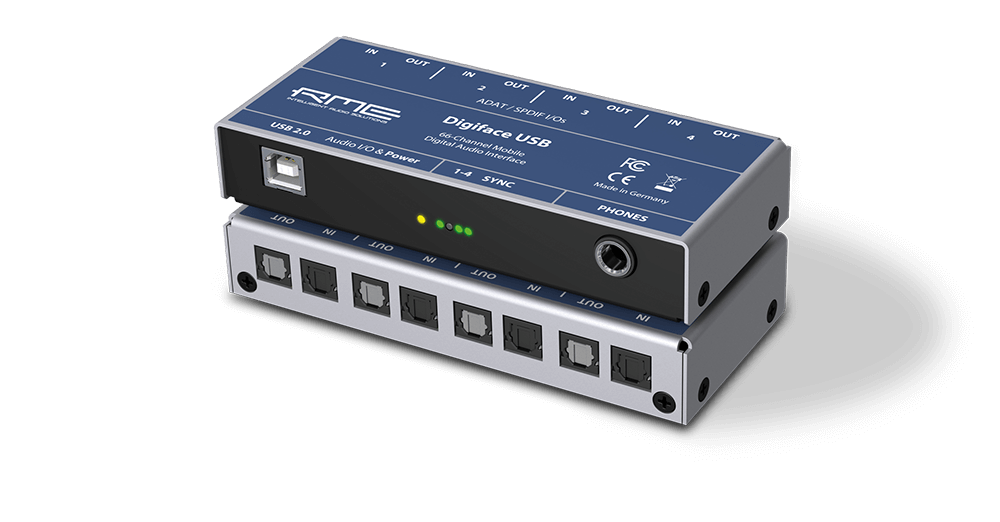
There is an important limitation, however: many interfaces require a computer and proprietary software to configure routing, sample rate, clocking, or other settings. In some cases, the interface only needs to be configured once. After that, it may retain its configuration and operate in standalone mode, allowing the Firewire connection and legacy computer to be removed from the setup. Whether this is possible depends entirely on the particular interface.
MOTU Traveler example:
Thunderbolt adapters
Modern Thunderbolt uses USB C connectors, but not every USB C connector supports Thunderbolt!
Another widely discussed option, particularly among Mac users, is to connect a Firewire interface through Thunderbolt adapters.
A typical setup consists of a Thunderbolt-to-Firewire adapter, potentially combined with additional adapters depending on the computer and the available ports. This allows computers without a native Firewire port to communicate with the interface through their Thunderbolt connection.
This can be a practical solution when the interface has drivers and control software that remain compatible with the version of macOS being used.
However, the adapter itself does not solve the driver problem. It only provides a physical and protocol path to the Firewire bus. The operating system still needs appropriate support for the audio interface.
Compatibility can also depend on the specific Thunderbolt generation, Firewire adapter, operating system, and interface.
Laptop PCIe Riser
Another possible approach is to expose a laptop's internal PCIe connectivity and attach a Firewire controller externally using a suitable riser or adapter.
For example, some older laptops expose Mini PCIe slots that can potentially be used with PCIe-based peripherals. In theory, a Firewire controller could be connected this way.

In practice, this solution is highly dependent on the particular laptop and slot. Not every Mini PCIe slot provides the same connectivity or is suitable for this kind of expansion.
There are also significant practical problems: the PCIe signals have to be brought outside the laptop chassis, the Firewire controller may require external power, and the resulting setup is hardly portable.
As with the other approaches, an appropriate driver and control software are still required for the operating system being used.
Here you can watch a netbook with an external GPU through PCI. The same would apply with a Firewire PCI card.
Host Middleware: Embedded Linux Firewire-to-UAC
This alternative is more theoretical than practical, but it is worth mentioning because it points toward an interesting possible architecture.
The idea would be to use a small Linux computer as a bridge between a Firewire audio interface and a modern computer. The embedded computer would communicate with the interface through Firewire and then expose the received audio to another computer as a USB Audio Class device.
There are several ways this could potentially be approached. Modern single-board computers such as the Raspberry Pi 5 expose PCIe connectivity that can be used with appropriate hardware, while projects such as Firehat have explored adding Firewire connectivity to small Linux-based computers so we can have a very optimized system to achieve the lowest possible latency.

Because these systems generally use ARM processors, running the original Windows or macOS drivers is not a realistic approach and also can not be tweaked enough to achive low latency as a Firewire to USB bridge. Linux support therefore becomes essential.
Linux already includes Firewire audio support through the ALSA ecosystem, and there are drivers for a number of Firewire audio interfaces. Some families of interfaces, including devices based on controller platforms such as DICE and BridgeCo, may therefore be possible candidates for this kind of experiment.
In principle, the Linux computer could receive audio from the Firewire interface and then use the Linux USB Gadget subsystem to present itself to another computer as a USB Audio Class device.
This would effectively create a Firewire-to-USB audio bridge, however, there are many caveats.
First, Firewire audio support under Linux is not equivalent to the mature ecosystem available for USB Audio Class devices. Compatibility varies between interfaces, controller families, kernel versions, and driver implementations. This makes it difficult to treat the Linux approach as a universal solution.
Second, the bridge itself introduces another layer of software, buffering, clock synchronization, and real-time processing between the original interface and the host computer. A successful implementation would therefore require careful attention to latency, synchronization, buffer management, and sample-rate handling.
Finally, while Linux USB Gadget is capable of exposing USB audio functionality and there are commercial devices that use Linux-based systems internally (like AKAI MPC or Headrush pedalboards), implementing a robust multi-channel USB Audio Class device is considerably more involved than simply forwarding a stereo audio stream.
For an interface with four, eight, or more inputs and outputs, the entire audio path, including channel mapping, sample rates, clocking, buffering, and USB bandwidth, would need to be handled correctly.
For these reasons, this is not currently a particularly attractive alternative for simply using an old Firewire interface. Nevertheless, it is an interesting architecture to document because it could become useful as the project evolves.
Keep away from fake USB to Firewire adapters!
You can find some strange connector adapters in some marketplaces with a USB A Male connector in one end and a Firewire 400 connector in the other end. These are a scam! They do not handle any kind of protocol conversion, they only have a few wires connected between the connectors.